Google Lets Restaurants Switch Off Delivery Apps; 82% of 240 Listings Show Order Online
Restaurants can now hide individual third-party ordering providers on their Google Business Profile, with separate switches for pickup and delivery, instead of asking each app to remove them. Our pull of 240 Google Maps restaurant listings in six cities found an Order online button on 196 of them.
 Vibhu Dhariwal
Cofounder & CTO, Digital Gratified
- Published
- Section
- Explainers
- Reading time
- 7 minutes
Ras Al Khaimah, United Arab Emirates, .
Restaurants can now switch off individual third-party ordering providers on their Google Business Profile themselves, instead of filing a removal request with each delivery platform and waiting up to five business days. Google's Lisa Landsman, Head of Industry Engagement and SMB Success, announced the control on LinkedIn on 28 October, saying operators had asked for "more control over their ordering links", as Search Engine Roundtable and Search Engine Journal reported. Google's ordering partner compliance requirements, last updated on 19 October, now say merchants may enable or disable a partner integration directly through product controls.
To see how many profiles this touches, we pulled 240 restaurant listings from Google Maps in six cities. 196 of them (81.7%) showed an "Order online" button, against 90 (37.5%) with a "Reserve a table" button. This explainer covers what changed, how to use the new switches, where the documentation still lags, and what local SEO teams should check first.
What changed
- Self-serve opt-out per provider. In the Food ordering section of a Business Profile, each provider now has a "Manage provider" panel with a "Show provider to customers" setting, according to the screenshot Landsman shared and Search Engine Journal described.
- Pickup and delivery are separate switches. A restaurant can hide a provider for delivery, for pickup, or for both.
- Providers are still on by default. Google's compliance page says "All partner integrations are enabled by default", so a provider that claims a relationship with a restaurant still appears until the owner turns it off.
- The old route still exists. Providers must still remove a merchant who asks to leave their feed, within five business days, under the same compliance page.
- Countries. Asked where the setting is available, a Google product manager replied "all" in the LinkedIn comments, Search Engine Journal reported. Google has not published a country list.
How the rules moved: a timeline
The change is the latest step in a slow shift of control from delivery platforms to restaurant owners. We compared the current Google pages with earlier versions described in prior coverage.
| Date | Where | What it said |
|---|---|---|
| February 2024 | Google Business Profile requirements for providers | Ordering providers had to give merchants a "remove provider" link explaining how to disable the integration, as Search Engine Roundtable reported at the time. |
| May 2026 | Ordering compliance policy (archived copy cited by Search Engine Journal) | Providers had to offer an opt-out method and act on requests within five business days. |
| 19 October 2026 | Ordering Redirect compliance requirements | Adds that merchants can enable or disable a partner through product controls, and that integrations are on by default. |
| 28 October 2026 | LinkedIn post by Lisa Landsman | Announces the per-provider switches in the Business Profile dashboard. |
| 1 November 2026 (our check) | Manage online ordering options help page | Still describes only "Remove link", the five business day provider deadline and reporting a violation. It does not mention "Show provider to customers". |
How to switch off a provider
Google's help page has not caught up, so the steps below combine the documented path with the new panel shown in the announcement screenshot.
- Open the Business Profile and select Food ordering.
- Pick the provider from the list. This opens its Manage provider panel.
- Under Show provider to customers, turn off Pickup, Delivery, or both.
- Save, then check the live profile in Search and Maps from a signed-out browser.
Two older controls sit beside the new switches. Set as preferred marks one option as the preferred choice for pickup or for delivery, and the help page notes that a pickup or delivery toggle cannot be switched if the provider does not offer that service. Accept orders on your profile is the master switch: turning it off hides every third-party option and every link you added yourself.
Worked example
Take a pizzeria listed with four delivery apps plus its own ordering page. Its margins are worst on one app's delivery orders, but regulars use that same app for pickup. Before this change, the only clean option was to ask that app to drop the restaurant entirely, losing the pickup orders too. Now the owner can turn off that app's delivery switch, leave its pickup switch on, and mark the restaurant's own page as preferred for delivery. Landsman's own advice cuts the other way as well: she argued that keeping several trusted providers can capture diners who already have an account or saved card on a given app, so the decision is about margin per channel, not removing as many as possible.
Our check: 240 listings, six cities
We ran 12 Google Maps searches ("pizza" and "thai restaurant" in New York, Chicago, Los Angeles, Houston, London and Toronto) and recorded the buttons on each of the 20 listings returned.
| City | Pizza listings with Order online | Thai listings with Order online |
|---|---|---|
| New York | 19 of 20 | 20 of 20 |
| Houston | 19 of 20 | 16 of 20 |
| Chicago | 16 of 20 | 15 of 20 |
| London | 15 of 20 | 16 of 20 |
| Toronto | 13 of 20 | 18 of 20 |
| Los Angeles | 17 of 20 | 12 of 20 |
| Total | 99 of 120 | 97 of 120 |
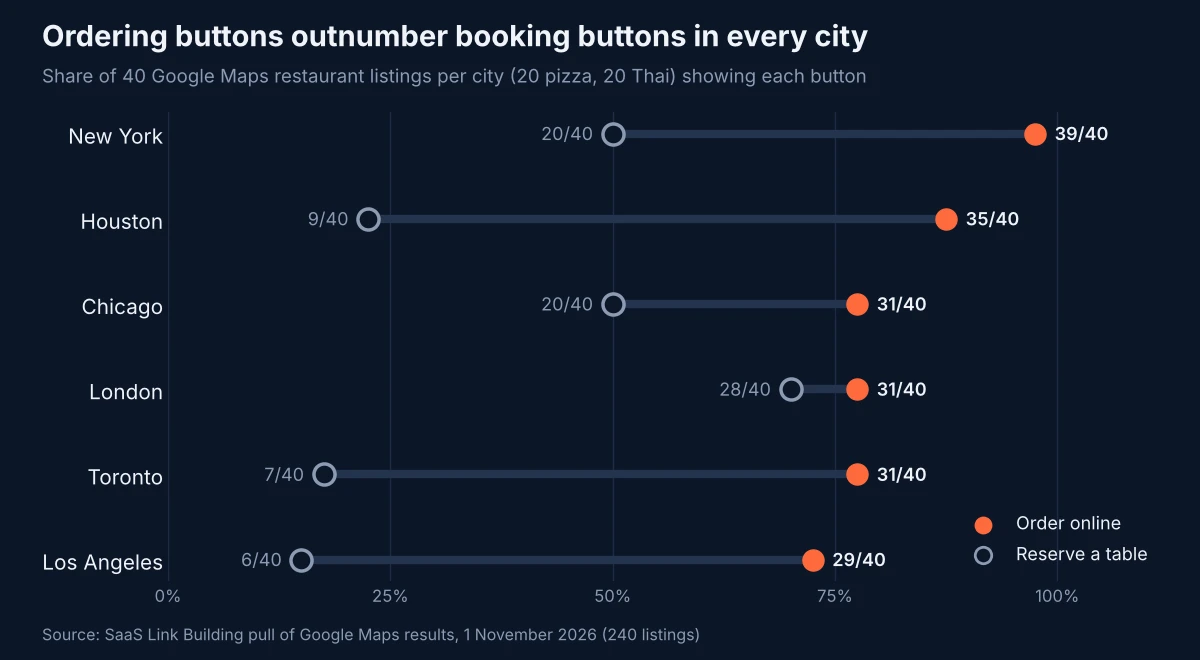
Three details stood out:
- Top positions carry the button. 34 of the 36 listings in positions one to three had Order online.
- A website is not required. Of the 11 listings with no website on their profile, 7 still offered Order online, which means a third party, not the restaurant, supplied the ordering path.
- Every button routes through Google first. All 196 Order online links pointed to a google.com ordering page rather than straight to a provider, which is the panel where the new switches decide which apps diners see. It fits a wider pattern we found when AI Mode linked product cards to Google's own pages.
Five listings were marked as unclaimed, and one of them showed an Order online button. The ordering controls are managed from the Business Profile itself, so an unclaimed location has to be claimed before anyone can use them.
What this means for SEO teams
For agencies and in-house teams running restaurant or multi-location food clients, the ordering panel is now part of the profile you manage, not something delivery partners own. Google keeps adding transactional layers to local results, from ordering to the Universal Cart it launched in US Search, and each one is a place where a third party can sit between the searcher and the client's own site.
- Audit every location. List which providers appear under Food ordering, for pickup and for delivery, and check each link lands on the correct, current menu. Landsman recommended reviewing active channels regularly for the same reason.
- Agree a channel policy with the client. Decide per provider and per service whether it stays on, using commission and order data rather than habit.
- Set a preferred option. Where the client has a first-party ordering page, add it as a link and mark it preferred for the services it handles.
- Claim unclaimed locations. Without ownership, none of these switches are available.
- Recheck after changes. Verify the live profile, and keep using the provider removal route or Google's violation report if a provider that should be gone reappears.
- Watch for bulk tools. The announcement did not say whether the setting works in bulk or through the Business Profile API, so large chains should expect to work location by location for now.
Ordering buttons also matter because local results are one of the few query types where Google still shows a classic interface; in our earlier test, AI Overviews appeared on only 2 of 15 local searches.
Methodology
On 1 November 2026 we collected Google Maps search results through a SERP API for two queries, "pizza" and "thai restaurant", each centred on downtown coordinates in New York, Chicago, Los Angeles, Houston, London and Toronto (12 searches, 20 listings each, 240 listings). London and Toronto used UK and Canadian Google settings; the US cities used default US English settings. For each listing we recorded whether the result included an Order online link, a Reserve a table link, a website, and an unclaimed flag, plus its position. We did not open the ordering pages, so we cannot say which or how many providers each listing showed, and results reflect one point in time from one location per city.
Conclusion
Google has moved the decision about which delivery apps appear on a restaurant's profile from the apps to the restaurant. The setting is simple, but it arrives with providers still switched on by default and a help page that does not yet describe it, so owners who never look will see no change.
With Order online on more than four in five of the listings we checked, the Food ordering panel deserves a place in every restaurant profile audit, alongside hours, categories and menus.
Questions and answers
Can restaurants remove a delivery app from their Google Business Profile?
Yes. Google announced on 28 October 2026 that restaurants can hide a specific third-party ordering provider from the Food ordering section of their Business Profile, with separate switches for pickup and delivery. Google's ordering compliance page says merchants may enable or disable a partner through product controls.
Are ordering providers shown on a profile by default?
Yes. Google's Ordering Redirect compliance requirements, last updated on 19 October 2026, say all partner integrations are enabled by default, but a merchant may disable a partner at any time.
Do providers still have to honour removal requests?
Yes. Google's compliance page still requires providers to remove a merchant that asks to leave their feed within five business days, and the Business Profile help page tells owners to report a violation if a provider does not act.
What does the Accept orders on your profile setting do?
According to Google's help page, turning off Accept orders on your profile hides every third-party ordering option and every custom ordering link from the Business Profile.
How common are Order online buttons on Google Maps?
In our 1 November 2026 pull of 240 Google Maps restaurant listings for pizza and Thai searches in six cities, 196 (81.7%) showed an Order online button and 90 (37.5%) showed a Reserve a table button.
More releases
-
Studies
Do Author Bylines Help You Rank? Only 27% of 77 Top Health and Money Pages Had One
Google says bylines do not help pages rank. We checked 213 top-10 results for 24 queries: only 21 of 77 readable health and money pages named an author, top positions were about as likely to have one as lower ones, and none of 15 government, .edu or NHS pages did.
-
Industry news
Bing Tests Ads in AI Overviews; Our 36-Search Check Found 12 Overviews and No Ads Inside
Microsoft Bing appears to be testing sponsored results inside its Copilot AI Overviews, after a screenshot surfaced on 30 October. Our check of 36 US Bing results pages found AI Overviews on 12, none with an ad inside, though 10 of those 12 pages already carried ads.
-
Industry news
AI Shoppers Convert 90% Better, Adobe Says; 40 of 43 Retailers Don't Block AI Bots
AI-referred shoppers converted 90% better than other visitors on US retail sites in September 2026 and were worth 83% more per visit, Adobe data published on 29 October shows. Our robots.txt check of 43 large US retailers found 40 place no homepage block on nine AI crawlers, while Amazon blocks all of them.
Tell us the site and the goals.
Rankings in Google and visibility in AI answers, from one monthly plan. One call is enough to say which one fits. Email works just as well.