Google Tags Become Tag Manager Containers; 155 of 1,448 Top Sites Run gtag.js Alone
Google's 17 November Tag Manager release turns every standalone Google tag into a Tag Manager container, drops the gtag config command from new snippets and sets January 2027 for unsupported installs. Our crawl of 1,448 top-site homepages found 155 running gtag.js alone and 15 on setups Google calls unsupported.
 Vibhu Dhariwal
Cofounder & CTO, Digital Gratified
- Published
- Section
- Explainers
- Reading time
- 8 minutes
Ras Al Khaimah, United Arab Emirates, .
Google has started turning every standalone Google tag into a Google Tag Manager container. A Tag Manager release note dated 17 November 2026 says each Google tag "becomes a Tag Manager container", that new install snippets will drop the gtag('config') command, and that sites running what Google calls an unsupported installation will receive the upgrade in January 2027. To see who this touches, we crawled the homepages of the Tranco top 3,000 sites on 19 November: of 1,448 usable pages, 155 load the Google tag (gtag.js) with no Tag Manager snippet at all, and 15 use a setup Google's own help page labels unsupported.
What changed
The release note is the second step of a plan Google first set out in an August 20 announcement on Google tag and Tag Manager updates. Read together, the two pages make six concrete changes:
- Every Google tag is now a container. Sites that only use the Google tag gain Tag Manager's interface-driven tagging, debugging and version control. Google says the upgrade will not change how the tag behaves on the page.
- One tag per destination. Each Google destination (a GA4 property, a Google Ads account) gets its own tag inside the container, which Google says preserves existing setups and the triggers for automation events.
- One snippet for everyone. All new deployment snippets will be identical and will no longer contain the config command. Google recommends handling initialization with Tag Manager's standard Initialization trigger, which can also be set to wait for a config command if you want to keep a legacy setup.
- Permissions move to Tag Manager. Access to data in Tag Assistant will follow the container permissions already set in Tag Manager.
- Optimization is opt-in. The August page says "no changes will be made automatically" to existing Tag Manager containers; users with edit, approve or publish rights start the optimization from a banner and preview it before publishing.
- A January 2027 date for unsupported installs. Sites using an unsupported gtag.js installation get the upgrade then, and Google advises fixing the setup first.
The timeline so far
Google's Tag Manager release notes show a run of smaller changes leading up to the unification, which helps date any measurement shift this autumn.
| Date (2026) | Release | What it did |
|---|---|---|
| 20 August | Updates to Google tag and Tag Manager | Announced the unification, a simplified Overview page and visual tagging (beta for Google Ads purchase conversions) |
| 8 October | Standardized gtag('config') behaviour | Tag Manager container snippets now initialize on load whatever config commands a page holds; config commands appear in the dataLayer as gtag.config events |
| 12 October | Optimizing Tag Manager containers | Containers can send data straight to Google destinations instead of loading an extra copy of gtag.js |
| 17 November | Google tag and Tag Manager unification | Each Google tag becomes a container; new snippets lose the config command; Tag Manager permissions apply to Tag Assistant |
| January 2027 | Upgrade for unsupported installations | Date given in the 17 November note for sites on unsupported setups |
The 8 October change has a side effect worth checking: Google warns that containers using wildcard custom event triggers may now fire tags on the new gtag.config events.
Key findings from our crawl
We fetched each homepage once and read the raw HTML for Google's two loader scripts and for inline config commands. Snippets injected later by other scripts are not counted, so treat these as lower bounds.
- 717 of 1,448 homepages (49.5%) load at least one Google tagging snippet directly in their HTML.
- Tag Manager dominates: 562 load gtm.js, against 219 that load gtag.js; 64 load both.
- 188 of the 219 gtag.js pages (85.8%) carry an inline
gtag('config')call, the line Google is removing from new snippets. 32 configure more than one tag ID. - Old IDs linger: 33 homepages still reference a Universal Analytics (UA-) ID, and 15 gtag.js pages configure nothing but UA- IDs. Google's Universal Analytics sunset page says standard properties stopped processing hits on 1 July 2023.
- 15 domains match Google's unsupported pattern, spread across 10 distinct tag IDs. Five of them are mirror domains of one site sharing a single ID.
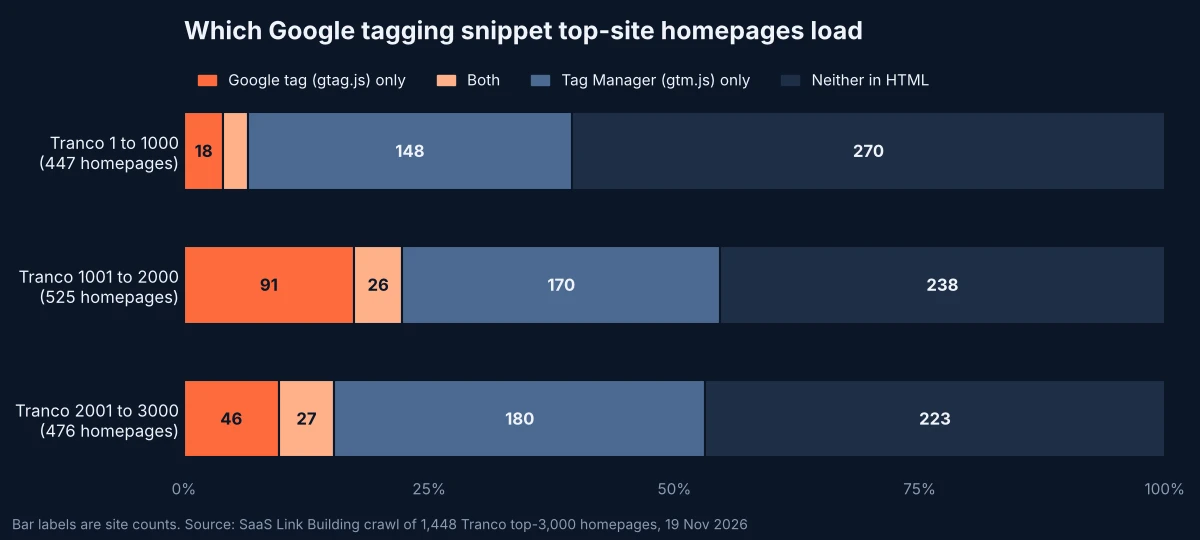
The split by rank is uneven: the very largest sites lean heavily on Tag Manager, while gtag.js-only installs cluster in the 1,001 to 2,000 band. Across all bands the 155 gtag.js-only pages use 139 distinct sets of tag IDs, so the count is not one network copying the same snippet.
What "unsupported" means in practice
Google's help page describes two patterns it does not support. The first deploys a non-Tag Manager ID (one that starts with G-, AW- or DC) through the Tag Manager snippet path, gtm.js. The second keeps a Tag Manager snippet on the page but relies on a bare gtag('config') line, with no gtag.js loader, to configure Google Ads or Analytics IDs. Google says containers with the unsupported setup received an email notification.
In our crawl, 9 homepages showed the second pattern with a G- or AW- ID and 6 showed the first. Three examples we confirmed with a second fetch on 19 November: ssl.com, cymru.com and gumgum.com each serve a Tag Manager snippet followed by a gtag('config') call for a G- ID, with no gtag.js loader in the homepage HTML. A container can still load the Google tag itself, which is why these pages may record data today; Google's point is that the behaviour is not guaranteed once snippets are standardized.
Google's supported version of a direct install looks like this, with your own ID in place of TAG_ID:
<script async src="https://www.googletagmanager.com/gtag/js?id=TAG_ID"></script>
<script>
  window.dataLayer = window.dataLayer || [];
  function gtag(){dataLayer.push(arguments);}
  gtag('js', new Date());
  gtag('config', 'TAG_ID');
</script>
Google's fix for the unsupported case is to remove the gtm.js snippet and the stray config lines, then paste the gtag.js snippet immediately after the opening head tag on every page.
The ID prefix now decides what a tag can run
One detail in Google's documentation matters beyond analytics. A help page on managing tagging behaviour with the container ID says an ID beginning GTM- can run all tag types, including third-party scripts and custom HTML, while an ID beginning G- or AW- is limited to sending data to Google services, whichever path (/gtag/js or /gtag/destination) loads it. Moving a site from a G- ID to its GTM- ID is therefore also a decision to allow arbitrary script execution from the container. After this month's Optimizely supply-chain compromise, teams that tighten third-party script controls should treat that switch as a security change, not only a measurement one.
What this means for SEO teams
Organic reporting starts with the same snippet: GA4 landing page and channel data are only as good as the tag that records them. Google's documentation on Search referer values helps classify traffic, but only if the hit is recorded at all, and small tagging changes have skewed attribution before, as when Gemini dropped its utm_source parameter.
What to do
- Find your pattern. View source on a homepage and a template page. Look for
googletagmanager.com/gtm.js,googletagmanager.com/gtag/jsand anygtag('config'lines, and note each ID prefix. - If you run gtag.js alone, nothing should change on the page, but check who can now see Tag Assistant data, because access follows container permissions.
- If you pass parameters through the config call (for example a custom page title or a disabled page view), move that logic into the Initialization trigger or a tag setting in the container before you copy any new snippet into a CMS or theme.
- If you match an unsupported pattern, switch to the gtag.js snippet above before January 2027.
- If you use Tag Manager with wildcard custom event triggers, check whether they now fire on
gtag.configevents, per the 8 October note. - Delete UA- config lines. They send hits to properties that no longer process data.
- Decide the ID prefix on purpose: G- or AW- if the container should only ever talk to Google, GTM- if you need custom HTML or third-party tags.
Methodology
We took the first 3,000 domains of the Tranco list L5KW4 (generated 18 November 2026) and requested each homepage once on 19 November 2026 between 05:24 and 05:27 UTC, trying https://www. first and then the bare domain, with a desktop Chrome user agent and redirects followed. 1,448 homepages returned HTTP 200 with more than 5 KB of HTML; the rest were blocked, errored or had no web page. In the raw HTML we counted pages that reference gtm.js or a GTM- ID (Tag Manager), pages that reference googletagmanager.com/gtag/js (Google tag), inline gtag('config', ID) calls, and the ID passed in the standard Tag Manager loader. A page counted as unsupported if it loaded Tag Manager, had no gtag.js loader and configured a G-, AW- or DC- ID inline, or if it passed a non-GTM ID through the Tag Manager loader. We did not execute JavaScript, so tags added by other scripts, consent tools or server-side containers on custom domains are not counted; homepage results may not reflect inner pages; and a site serving different HTML by region or to automated requests may be classified differently.
Conclusion
For most sites in our sample the 17 November change is invisible: 498 homepages already run Tag Manager without gtag.js, and Google says in-page behaviour stays the same for the 155 that run gtag.js alone. The work sits at the edges, in the config-command customisations Google is retiring from new snippets, in the 15 domains on setups it calls unsupported, and in the 33 homepages still pointing at Universal Analytics.
Questions and answers
Will the upgrade change how my Google tag behaves on the page?
Google says no. Its 17 November release note states the upgrade won't change the in-page behaviour of Google tags; sites that use only the Google tag gain the option to use Tag Manager features such as interface-driven tagging, debugging and version control, and each Google destination gets its own tag.
What does Google count as an unsupported installation?
Google's help page lists two patterns: deploying a non-Tag Manager ID (starting G-, AW- or DC) through the Tag Manager snippet path, gtm.js, and keeping a Tag Manager snippet while relying on a bare gtag('config') command, without the gtag.js loader, to configure those IDs. The fix Google gives is to use the standard gtag.js snippet.
What happens in January 2027?
According to the 17 November release note, sites with an unsupported installation will receive the upgrade in January 2027, and Google advises adjusting the setup before then.
Do new Google tag snippets still include the config command?
No. Google says all new deployment snippets will be identical and will not contain the gtag config command. It recommends configuring initialization with Tag Manager's Initialization trigger, which can also be set to wait for a config command to preserve a legacy setup.
Is there a difference between a G- ID and a GTM- ID?
Yes. Google's help page on container IDs says a GTM- ID can run all tag types, including third-party scripts and custom HTML, while an ID starting G- or AW- is limited to sending data to Google services, whichever path loads it.
More releases
-
Updates
Google Retires Its Data Feed Validator; All 18 Book Actions Translations Still Link It
Google removed its retired Data Feed validation tool from the English book actions documentation on 18 November, leaving two manual checks and no replacement. Our check found all 18 translated versions still link to the tool, which now returns a 404, and still carry a 20 February update stamp.
-
Industry news
Bing Opens Web IQ to All Azure Users; 107 of 128 Sites That Block AI Bots Admit Bingbot
Microsoft made Web IQ, its Bing-powered grounding service for AI agents, available to all Azure customers on 17 November, fed by Bingbot's index. Our crawl of 508 top-site robots.txt files found 107 of the 128 sites that block AI crawlers still let Bingbot in, and one homepage using Bing's grounding opt-out.
-
Studies
Optimizely Hack Hit 178 Brands; 123 of 3,009 Top Sites Run a CSP That Would Block It
An attacker used an Optimizely signup flaw on 16 November to plant malicious JavaScript in customer snippets served on 178 organisations' sites. Report URI found a strict Content Security Policy stopped it. Our crawl of 3,009 top homepages found only 123 with a policy that blocks both routes the payload used.
Tell us the site and the goals.
Rankings in Google and visibility in AI answers, from one monthly plan. One call is enough to say which one fits. Email works just as well.