Google Business Profiles Add Messenger Chat; 0 of 100 Help Page Versions Mention It
Facebook Messenger now appears as a Chat option in some Google Business Profiles, Search Engine Roundtable reported on 16 November. Google has not announced it: all 100 language versions of its two help pages on profile messaging still list only WhatsApp and text, and its Business Profile API documents no Messenger field.
 Vibhu Dhariwal
Cofounder & CTO, Digital Gratified
- Published
- Section
- Industry news
- Reading time
- 6 minutes
Ras Al Khaimah, United Arab Emirates, .
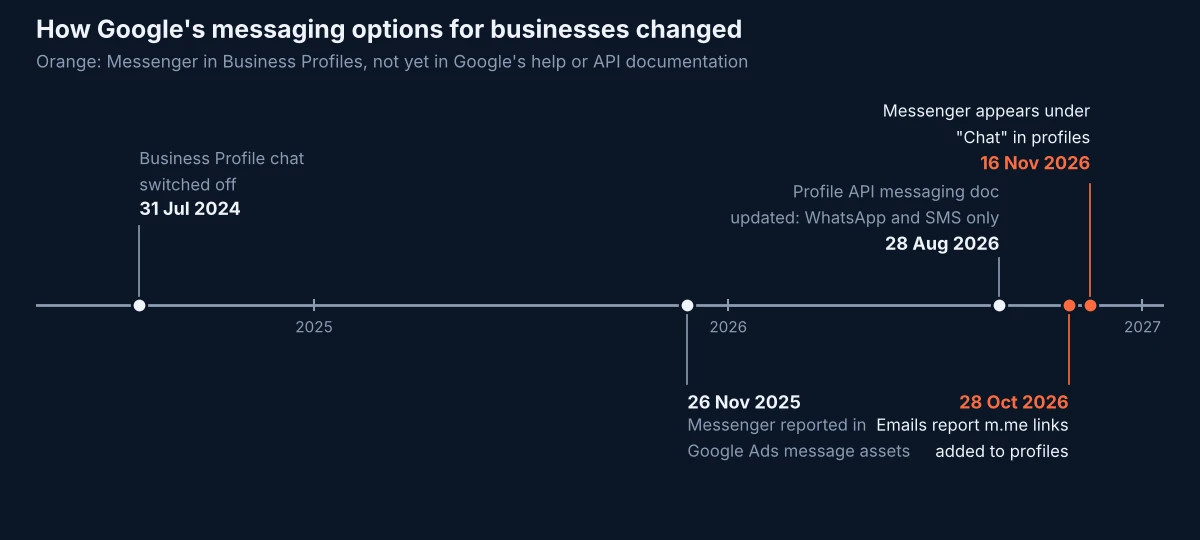
Facebook Messenger has started to appear as a chat option inside Google Business Profiles, more than two years after Google switched off its own profile chat. Search Engine Roundtable reported on 16 November 2026 that Syed Amir had spotted Messenger listed under the "Chat" field in the profile editor, and that the site's author confirmed the option in his own account. Google has made no announcement. When we checked Google's documentation on 17 November, every one of the 100 language versions of its two help pages on profile messaging still described only two options, WhatsApp and text messages.
The change follows a quieter step three weeks earlier. On 28 October, Search Engine Roundtable reported that some businesses had received emails from Google saying it was automatically adding Messenger m.me links to their profiles. Messenger is now also available to add by hand, at least for some accounts.
What changed
- A third chat channel: profile owners who see the option can now pick Messenger in the Chat dropdown, alongside WhatsApp and text messaging, according to the 16 November report.
- Some links were added for owners: the October emails described Google adding m.me links automatically, which means some profiles may already show a Messenger contact their owners did not set up themselves.
- No Google documentation yet: Google's chat help page still tells owners to "select either WhatsApp or Text message", and a second page on contact options says the same.
- Not in the API: the Business Profile API guide on messaging covers two attributes only, and the API's release log has no entry for Messenger.
What Google's own pages say, checked in 50 languages
To test whether the option had reached Google's documentation anywhere, we fetched both help center articles on profile messaging with 50 language codes and searched each for Messenger, in Latin script and in local spellings. We then read the API guide, the API update log and the Google Ads help page on message assets.
| Google source | Versions checked | Lists WhatsApp and text | Mentions Messenger |
|---|---|---|---|
| Help: Chat with customers from your Business Profile | 50 languages | 50 | 0 |
| Help: Add text and WhatsApp messaging options | 50 languages | 50 | 0 |
| Business Profile API guide: Add WhatsApp and Text URLs (last updated 28 August 2026) | English | Yes | No |
| Business Profile API latest updates log (newest entry 2 November 2026) | English | No messaging entries | No |
| Google Ads help: About message assets | English | Yes | Yes, with m.me URLs |
Source: SaaS Link Building check of Google help center and Google for Developers pages, 17 November 2026. Hebrew and Persian versions spell WhatsApp in local script; we counted those spellings.
The gap matters most for anyone who manages profiles at scale. Google's API guide on messaging explains how to set the url_whatsapp and url_text_messaging attributes with a PATCH request. It documents no attribute for Messenger, so agencies and multi-location tools that push profile data through the API have no documented way to add or remove a Messenger link. The API's latest updates log, whose newest entry is dated 2 November, mentions neither Messenger nor chat.
The only Google page we found that documents Messenger as a business contact channel sits on the ads side. Google's message assets help page tells advertisers to supply a Messenger URL in the form m.me/username, the same link format the October emails described. Search Engine Roundtable first reported Messenger and Zalo appearing in Google Ads on 26 November 2025.
How profile chat got here
Google once ran its own messaging inside Business Profiles. According to its help page on the change, the chat and call history features stopped working on 31 July 2024. The same page points owners to text messages or WhatsApp as the replacement for eligible accounts. That replacement hands the conversation to another app: Google shows the link, and the chat itself happens on the phone's SMS app or on WhatsApp.
Messenger follows the same model. It adds a third outside app, and a second Meta-owned one alongside WhatsApp. It also arrives while Meta is changing how it deals with business websites, as in Meta's delayed crawling terms for sites its bots visit.
The chat help page also carries two rules that owners should keep in mind. It says chat options are available only in select regions, and that if a profile has both WhatsApp and text messaging set, only the text option is shown to customers. Google has not said where Messenger sits in that order.
What this means for local SEO teams
- Audit profiles for links you did not add. Because the October emails described links being added automatically, check the Chat field on every profile you manage. A Messenger link tied to an old or unmonitored Facebook Page sends customers to an inbox nobody reads.
- Pick one channel and staff it. Google shows one chat option at a time when text and WhatsApp are both set. Until it documents the Messenger rule, test what customers actually see on mobile Search and Maps after any change.
- Track the Messages metric. Google's performance report counts "the number of different conversations through messages". Note the date you add or change a chat link so you can compare before and after.
- Do not rely on the API for Messenger yet. Bulk tools can set WhatsApp and SMS attributes as documented. Messenger links currently need the profile editor, and links Google adds automatically may not match your own records.
- Treat chat as part of the conversion path. Contact options are one more place where Google decides how customers reach a business, as with the ordering provider controls Google gave restaurants.
Methodology
On 17 November 2026 we requested Google's help center articles 15013580 ("Chat with customers from your Business Profile") and 16751381 ("Add text and WhatsApp messaging options") with each of 50 language codes the help center supports, giving 100 page versions. All 100 returned HTTP 200. We removed scripts and styles and searched the remaining text for "Messenger", "Facebook" and "Zalo", and for Messenger in Cyrillic, Hebrew, Arabic, Korean and Japanese script. One Polish match came from the word for "sign in" and was discarded. We also read the English versions of the Business Profile API guide on WhatsApp and text URLs, the API latest updates log, the Google Ads message assets help page and the Business Profile help page on the end of chat. We did not test which chat option customers see on live profiles.
Conclusion
Messenger is becoming a third chat channel in Google Business Profiles, first through links Google added for some owners and now as an option owners can pick themselves. Google has not documented it: none of the 100 language versions of its messaging help pages mention it, and its API supports only WhatsApp and text.
Until Google publishes guidance, the practical work is housekeeping: check which chat link each profile shows, make sure someone answers it, and record changes so their effect on profile messages can be measured. Teams already watching how Google routes local actions, such as the booking cards in AI Mode, should add chat links to the same checklist.
Questions and answers
Can I add Facebook Messenger to my Google Business Profile?
Some profile owners now see Messenger as an option under Chat in the profile editor, according to reports collected by Search Engine Roundtable on 16 November 2026. Google's own help page on chat still lists only WhatsApp and text messaging, so the option may not be available to every profile.
Has Google announced Messenger support for Business Profiles?
No. When we checked on 17 November 2026, neither of Google's two Business Profile help pages on messaging mentioned Messenger in any of their 50 language versions, and the Business Profile API changelog had no entry about it.
Can I add Messenger to profiles through the Business Profile API?
Not as documented. Google's API guide on messaging covers two attributes, url_whatsapp and url_text_messaging. It describes no Messenger attribute.
What happens if a profile has both WhatsApp and text messaging set?
Google's help page says that if both are added, only the text message option is shown to customers. Google has not said how a Messenger link fits into that rule.
When did Google Business Profile chat shut down?
Google's help center says the chat and call history features stopped being available in Business Profiles on 31 July 2024. WhatsApp and text messaging links replaced it for eligible accounts.
More releases
-
Studies
Meta Paused Its Crawling Terms; Only 2 of 485 Top Sites Block Its Ads Crawler
Meta has paused the business terms that would have let it crawl advertisers' websites from 20 November. Our repeat robots.txt crawl of the top 1,000 domains finds little change: 12.8% of 485 sites now block Meta's AI training crawler, up from 12.0% in October, and only 2 block Meta-ExternalAds.
-
Updates
Google Details How to Allow Google-Agent; 24 Top Sites Block a Name Google Never Listed
Google published a guide on 17 November explaining how to let Google-Agent through CDNs, firewalls and bot managers. Our crawl of 1,159 top-site robots.txt files the same day found 24 naming an undocumented GoogleAgent-Mariner token, against 14 naming Google-Agent, which Google says generally ignores robots.txt.
-
Studies
Are AI Overviews Cutting Clicks More Than Google Admits? The Evidence Says Likely
A pre-registered experiment with 1,065 US users found AI Overviews cut organic clicks by about 38% on the searches where they appear, while Google speaks only of stable totals and higher quality clicks. Our pull of 24 mobile results pages found the AI Overview on top of all 22 that showed one.
Tell us the site and the goals.
Rankings in Google and visibility in AI answers, from one monthly plan. One call is enough to say which one fits. Email works just as well.