Mueller Says Robots.txt Can Hide Pop-ups From Google; 28 of 33 Widget Hosts Don't Block It
Google's John Mueller says blocking a pop-up's script in robots.txt should generally keep Google from rendering it. Our 4 November check found only 5 of 33 consent, pop-up, chat and age-verification script hosts block Googlebot themselves, so most sites need to disallow their own loader file instead.
 Vibhu Dhariwal
Cofounder & CTO, Digital Gratified
- Published
- Section
- Explainers
- Reading time
- 7 minutes
Ras Al Khaimah, United Arab Emirates, .
Google's John Mueller has told site owners that robots.txt can stop Google from rendering a pop-up, as long as the script that loads it is blocked. Answering an r/TechSEO question about an age-verification pop-up, reported by Search Engine Roundtable on 3 November, Mueller said blocking the pop-up's source "would generally work". He described two routes: rely on the third-party host's own robots.txt, or disallow your own loader file. We checked how far the first route gets you. Of 33 third-party consent, pop-up, chat and age-verification script hosts we tested on 4 November, only 5 stop Googlebot fetching their scripts.
What Mueller described
According to the Search Engine Roundtable report, the question came from a site that loads an age-verification pop-up through a third-party service and wanted to know whether a robots.txt disallow on that service's domain would keep Google from rendering it. Mueller's answer, as reported, covered two approaches:
- The third-party host blocks crawling. If the pop-up is served from another domain and that domain's robots.txt disallows it, Googlebot will not fetch it while rendering your page. Mueller noted that many ad services already work this way.
- You block your own loader file. If your site loads the pop-up through its own JavaScript file, you can disallow that file in your robots.txt. He advised against this when the file bundles other functions, because blocking it would block those too.
In both cases the page has to work without the blocked resource. That matches Google's robots.txt introduction, which says you can block unimportant script or style files if pages loaded without them "won't be significantly affected", but should not block resources Google needs to understand the page.
Why the third-party route usually fails
The first route depends entirely on a file you do not control. Google's robots.txt specification says a robots.txt file only applies to its own host, protocol and port, so your own file cannot block a script on someone else's CDN. The same page says Google treats every 4xx response except 429 as if no robots.txt file exists, which means no crawl restrictions.
To see what that means in practice, we fetched the robots.txt file of the host that serves the loader script for 33 widely used vendors and tested each script URL against the rules for Googlebot.
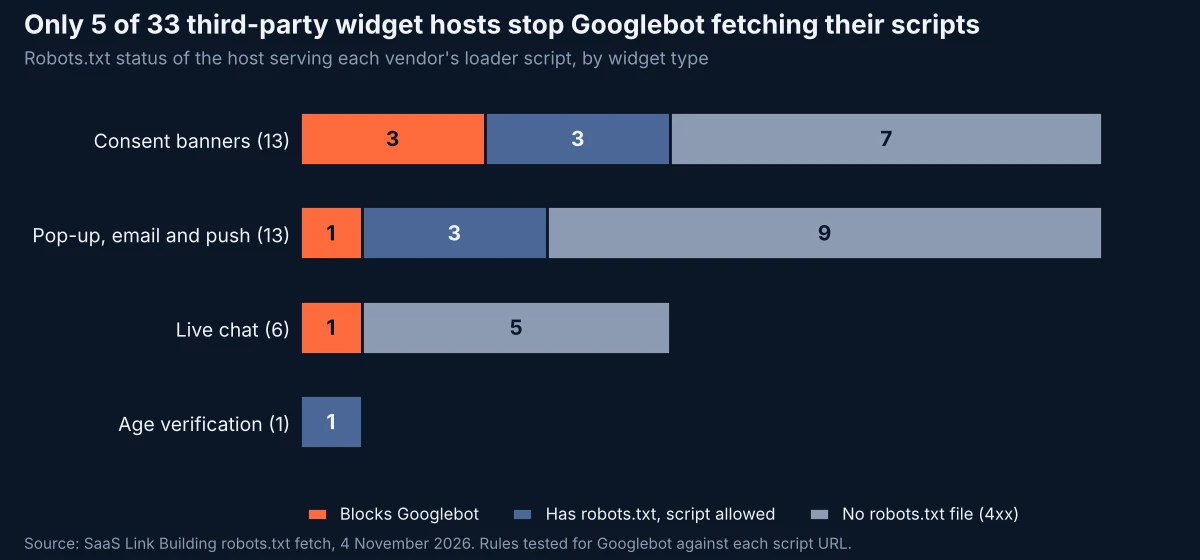
Twenty-one of the 33 hosts returned a 4xx response for robots.txt (most were 403 or 404), so Google would treat them as fully crawlable. Seven had a robots.txt file that still allowed the script. Only five, all with a blanket Disallow: /, would keep Googlebot from fetching the script.
| Widget type | Script host blocks Googlebot | Robots.txt allows script | No robots.txt (4xx) |
|---|---|---|---|
| Consent banners (13) | Didomi, Osano, Sourcepoint | iubenda, Termly, Usercentrics (legacy loader) | Cookiebot, CookieYes, Google Funding Choices, OneTrust, Quantcast Choice, TrustArc, Usercentrics |
| Pop-up, email and push (13) | Postscript | Attentive, Omnisend, OneSignal | ConvertFlow, Hello Bar, Justuno, Klaviyo, OptinMonster, Poptin, Privy, Sleeknote, Wisepops |
| Live chat (6) | Intercom | None | Crisp, Drift, Tawk.to, Tidio, Zendesk |
| Age verification (1) | None | AgeChecker.net | None |
Two results stand out. Google's own consent tool host, fundingchoicesmessages.google.com, returned a 404 for robots.txt, so Googlebot can fetch it. And the only age-verification script host we could test with confidence, the one most relevant to the Reddit question, allows every crawler.
What large sites already block
The second route, blocking your own loader, is already in use on some large sites. We fetched robots.txt for the top 1,000 domains in the Tranco list and got a readable file from 531. Of those, 28 had Googlebot rules that disallow named JavaScript files or .js patterns, and 39 disallowed URLs whose paths point to pop-ups, modals, overlays, interstitials or consent screens.
- indeed.com disallows
/tos/banner.js, a file whose name suggests a terms banner. - tripadvisor.com disallows
/InterstitialsWidget,/DhtmlPopupand/Consent. - merriam-webster.com disallows
/interstitial-ad, and repubblica.it disallows/interstitial/. - trendyol.com disallows its popup API paths, such as
/en/get/api/popup/*. - washingtonpost.com disallows
/gdpr-consent/.
We cannot tell from robots.txt alone why each rule exists, so treat these as patterns, not proof of intent. They do show that keeping dialog code on its own path, where it can be blocked without touching the main bundle, is a setup large sites already run.
If you are new to how Google reads these files, our earlier pieces on robots.txt fields Google ignores and Google's rules on decorative and AI directives in robots.txt cover the syntax side.
Where this fits with Google's interstitial guidance
Google's page on avoiding intrusive interstitials and dialogs says such overlays make it hard for search engines to understand content and may lead to poor search performance. It exempts legally required interstitials, giving a casino age gate as the example, but still recommends overlaying the content rather than redirecting every request to a single consent page, since Googlebot would then only be able to fetch that page.
For adult content behind a mandatory age gate, the same page recommends a third option that Mueller's reported answer did not cover: verify that a request really comes from Googlebot and serve the content without the gate. Google's crawler verification guide explains the reverse and forward DNS check. Our test of Google crawler IP addresses found gaps in reverse DNS coverage, so pair the DNS check with Google's published IP lists.
What to do
- Find the real script host. Open your page with the browser's network panel and note the domain and path of the file that injects the dialog. Vendors often load a small stub that pulls further files from a second host, so check every file in the chain.
- Read that host's robots.txt as Google would. A 403 or 404 means no restrictions. Only a rule that disallows the script path for Googlebot or for all user agents blocks it.
- If the host allows Googlebot, block your own loader instead. Put the code that triggers the dialog in its own small file on a dedicated path, for example
/js/age-gate-loader.js, and addDisallow: /js/age-gate-loader.js. Do not block a shared bundle that also renders navigation or main content. - Test the result. Run a live test in the URL Inspection tool, then open the tested page's More info panel to see which resources loaded, and check the screenshot shows your content without the dialog.
- Allow for caching. The robots.txt specification says Google generally caches robots.txt for up to 24 hours, so a new rule may not apply straight away.
- For mandatory adult age gates, consider verified Googlebot access as Google's interstitial page recommends, rather than relying on robots.txt alone.
Methodology
On 4 November 2026 (around 01:00 UTC) we built a list of 33 consent, pop-up, email, push, chat and age-verification vendors whose loader script host we could identify, fetched https://<host>/robots.txt for each, and tested the script URL for the Googlebot user agent with an open-source parser that applies Google-style longest-match rules. Responses were classed using Google's documented handling: 4xx (other than 429) as no robots.txt. Of 42 hosts we started with, nine were excluded: four that timed out or failed through our network, four whose script path we could not confirm, and one marketing-suite host we left out of scope. Some 403 responses came from storage buckets that return 403 for missing files; we treated them as Google's specification does. Vendors can serve customers from other hosts, so a site's actual setup may differ.
For the second dataset we downloaded the Tranco top 1 million list on the same day, took the first 1,000 domains, and fetched robots.txt at the root domain with a fallback to the www host. 531 returned a readable file. For each we took the Googlebot group, or the * group where no Googlebot group existed, and searched its Disallow rules for .js file patterns and for paths containing popup, pop-up, modal, overlay, interstitial, consent, cookie banner, age gate or age verification terms. We did not render any pages.
Conclusion
Mueller's reported advice is sound, but the easy version of it, leaning on a vendor's robots.txt, works for only a small minority of the widget hosts we checked. For most sites that want Google to render their pages without a pop-up, the practical fix is the one he described second: move the dialog loader into its own file, disallow it, and confirm in URL Inspection that the page still renders its main content.
Questions and answers
Can robots.txt stop Google from rendering a pop-up?
Generally yes, according to John Mueller as reported on 3 November 2026. If the script that loads the pop-up is disallowed for Googlebot, Google will not fetch it while rendering the page. The page must still work without that script.
Can my robots.txt block a script hosted on another domain?
No. Google's robots.txt specification says a robots.txt file applies only to its own host, protocol and port. Only the third-party host's own robots.txt can block a script it serves.
What does Google do if a script host has no robots.txt?
Google treats all 4xx responses except 429 as if no robots.txt exists and assumes there are no crawl restrictions. In our check, 21 of 33 widget script hosts returned a 4xx for robots.txt.
How does Google suggest handling mandatory age gates?
Google's interstitials guidance exempts legally required interstitials but recommends overlaying content rather than redirecting to a consent page. For adult content it recommends verifying Googlebot requests and serving the content without the age gate.
How quickly does a robots.txt change take effect for Google?
Google's robots.txt specification says Google generally caches robots.txt for up to 24 hours, and can cache it longer if it cannot refresh the file.
More releases
-
Industry news
AI Mode Sent 35 of 49 Flight Links to Google Pages; Booking Sites Got Just 2
Google AI Mode sent 35 of 49 links in 24 US flight searches to its own pages, mostly Google Flights, our 3 November check found. Booking and fare-comparison sites got 2, despite holding 49% of organic results. Six answers did link elsewhere, mostly to airlines.
-
Studies
Google Will Switch Off Search for K-12 Students; AI Overviews Solved 8 of 8 Test Problems
Google will turn off Search and Gemini for K-12 student accounts until schools opt in, and is piloting a Guided Learning mode that coaches homework instead of answering it. In our 40 homework searches, AI Overviews appeared on every one and gave the final answer to all 8 problems that fully loaded.
-
Industry news
Google Moved Brand AI Overviews to the Right Column on 22 of 51 Brand Searches We Checked
Google is now showing AI Overviews for brand-name searches in the desktop right column beside the knowledge panel. In our 3 November pull of 60 US brand searches, 51 had an AI Overview and 22 of those sat in the right column, mostly for retail, restaurant and travel brands rather than software.
Tell us the site and the goals.
Rankings in Google and visibility in AI answers, from one monthly plan. One call is enough to say which one fits. Email works just as well.