Checkout Showed Up in 25% of AI Agent Sessions: How to Spot Google-Agent in Your Logs
Sessions involving AI agents recorded a checkout 25.21% of the time against 14.65% for humans, Microsoft Clarity data from 230,511 sites shows. Here is what agents do on websites, where the study needs care, and how to verify Google-Agent with its user agent, IP file and signed requests.
 Vibhu Dhariwal
Cofounder & CTO, Digital Gratified
- Published
- Section
- Explainers
- Reading time
- 7 minutes
Ras Al Khaimah, United Arab Emirates, .
Sessions involving AI agents recorded a checkout in 25.21% of cases, against 14.65% of human-only sessions, according to a Microsoft Clarity study published on 29 October 2026. Clarity looked at agent sessions on 230,511 sites between 13 August and 9 September 2026 and found that agents reach the transactional parts of a site far more often than they click away from it. Clarity also says agentic session volume in its data rose 88% in three weeks.
The study tells site owners what agents do. It does not tell them how to see agents in their own data. This explainer covers both: what the Clarity numbers show and where they need care, and how to identify Google's own agent, Google-Agent, using the user agent, IP file and signature details Google documents. We checked each of those against Google's live files on 31 October.
What the Clarity study found
Clarity classified a session as agentic when it detected an agentic browser provider from the OpenAI, Google or Anthropic ecosystems. It then compared the Smart Events (Clarity's automatic tracking of actions such as checkouts, form submissions and searches) recorded in those sessions with human-only sessions on the same group of projects over the same dates.
The headline difference is weighting, not behaviour. Agents and humans do mostly the same things, but in different proportions. We divided each agent share by the matching human share for the eight actions that appear in both of Clarity's top 10 lists.
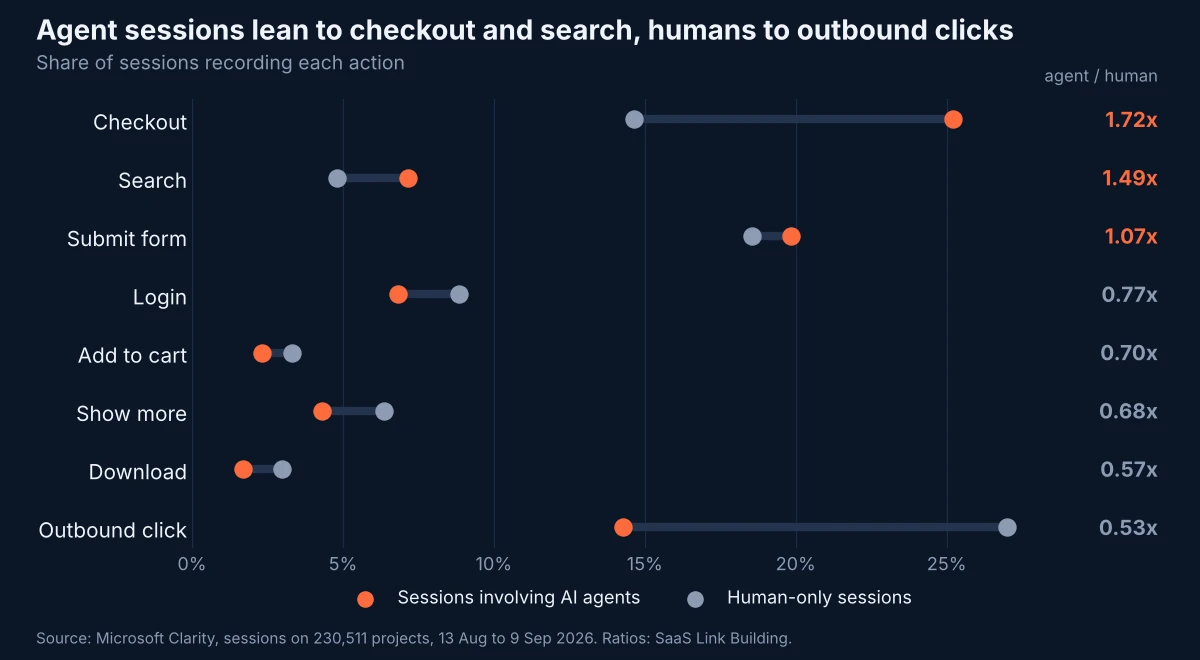
Three actions skew towards agents: checkout, on-site search and form submission. Outbound clicks are the reverse. They are the top human action, but appear in only about half as many agent sessions, which fits an agent that has been sent to finish a task on one site rather than browse. Two actions appear only in the agent top 10: booking an appointment (8.42% of agent sessions) and checking availability (2.41%).
Three caveats before you quote these numbers
- Agent sessions can include a human. Clarity says a session may involve a handoff to the person, and it cannot split the two. A checkout in an agent session is not proof the agent bought anything on its own.
- These are not funnels. Clarity says the events are independent session counts across sites and industries, so 25.21% checkout and 2.33% add to cart cannot be read as steps in one path.
- The base is unclear. Clarity describes 5.2 million agentic sessions, but its own counts imply a smaller base. 306,621 checkout sessions at 25.21% works out to about 1.22 million sessions, and every other row in its table gives a figure between 1.21 and 1.22 million. The post does not explain the gap, so treat the percentages as shares of roughly 1.22 million sessions until Clarity clarifies.
How Google-Agent identifies itself
Clarity's sample includes the Google ecosystem, and Google documents its agent alongside Googlebot in its crawler documentation. Google added the Google-Agent user agent on 20 March 2026, saying it would roll out over the following weeks, and added Web Bot Auth documentation on 4 May. Its list of user-triggered fetchers says Google-Agent is used by agents hosted on Google infrastructure to navigate the web and perform actions on a user's request.
| Signal | What Google documents | What we found on 31 October |
|---|---|---|
| User agent | Desktop and mobile Chrome strings containing compatible; Google-Agent | Chrome version shown as W.X.Y.Z, so match the token, not the full string |
| IP ranges | user-triggered-agents.json | 20 prefixes (12 IPv4, 8 IPv6) covering 70,016 IPv4 addresses; none overlap Google's other four crawler files |
| Reverse DNS | google-proxy-***-***-***-***.google.com | Same pattern as Google's other user-triggered fetchers, so a hostname alone cannot single out the agent |
| Signed requests | Some requests carry Signature-Agent set to g="https://agent.bot.goog" | Key directory live, serving 5 Ed25519 public keys with a one-hour cache |
| Robots.txt | User-triggered fetchers generally ignore robots.txt because a user asked for the fetch | No robots.txt token is listed for Google-Agent |
The IP file is the surprise. It has only 20 prefixes, against 317 in Googlebot's common-crawlers file, but one of them is a full /16 (136.122.0.0/16). That gives the agent file 70,016 IPv4 addresses, more than the 34,592 in Google's four other crawler and fetcher files combined. Google has not said why the agent range is so large. Our earlier analysis of Google's crawler IP files covers the rest of the set.
What to do: three worked examples
1. Find Google-Agent requests in your logs
Search access logs for the token rather than the full string, because Google publishes the Chrome version as a placeholder. On a standard Nginx or Apache log, grep "Google-Agent" access.log returns the candidate lines. Then confirm each IP, because Google's verification page warns that user agent strings can be spoofed.
2. Confirm the IP against Google's agent file
Reverse DNS will return a google-proxy hostname on google.com, which passes Google's general test but is shared with other user-triggered fetchers. Our DNS test of Google's crawler ranges found the agent ranges resolve cleanly. To tell the agent apart, match the IP against the agent file itself:
import ipaddress, json, urllib.request

URL = "https://developers.google.com/static/crawling/ipranges/user-triggered-agents.json"
data = json.load(urllib.request.urlopen(URL))
nets = [ipaddress.ip_network(p.get("ipv4Prefix") or p.get("ipv6Prefix"))
        for p in data["prefixes"]]

def is_google_agent_ip(ip):
    addr = ipaddress.ip_address(ip)
    return any(addr.version == n.version and addr in n for n in nets)

print(is_google_agent_ip("136.122.46.14"))   # True: inside 136.122.0.0/16
print(is_google_agent_ip("66.249.66.1"))     # False: a Googlebot address
Refresh the file regularly. All five of Google's IP files were regenerated on 30 October, according to their creationTime fields.
3. Check signed requests where you can
If your CDN or firewall supports Web Bot Auth, Google says it will likely verify signed Google-Agent requests automatically. If you verify yourself, Google's steps are: fetch the key set from https://agent.bot.goog/.well-known/http-message-signatures-directory, cache it according to its Cache-Control header, and check the Signature and Signature-Input headers labelled g under RFC 9421. Google states that it does not sign every request, so an unsigned request is not evidence of a fake. Keep IP checks as the fallback.
What this means for SEO teams
- Do not block agents by accident. Rules written to stop scrapers can catch Google-Agent, which arrives with a Chrome-style string. Allowlist the agent file before tightening bot rules on checkout, booking or search pages, the pages Clarity found agents use most.
- Do not rely on robots.txt. Google says user-triggered fetchers generally ignore it, and there is no Google-Agent token. The robots.txt choices that matter for search and AI training, covered in our report on how agents use pages and protocols, do not control an agent acting for a user.
- Segment agent sessions before reading conversion rates. If agent sessions over-index on checkout and under-index on outbound clicks, mixing them with human sessions can shift funnel and engagement metrics as agent volume grows.
- Test your key flows with an agent. Run your checkout, booking and contact forms through an AI agent yourself and note where it stalls. Clarity's own advice is to track where agents progress smoothly and where a person still has to step in.
Methodology
On 31 October 2026 we downloaded the five IP range files linked from Google's verification page (common-crawlers, special-crawlers, user-triggered-fetchers, user-triggered-fetchers-google and user-triggered-agents) and counted prefixes and IPv4 addresses with Python's ipaddress module, then tested every agent prefix for overlap with the other four files. We sampled five addresses in each of the 20 agent prefixes (90 unique addresses) and ran reverse and forward DNS lookups through Google Public DNS over HTTPS; all 90 resolved to google-proxy hostnames on google.com and confirmed forward. We fetched the agent.bot.goog key directory and recorded its keys and Cache-Control header. Ratios in the chart divide Clarity's published agent share by its human share for the eight actions in both top 10 lists. The implied session base divides each agent session count by its published percentage.
Conclusion
Clarity's data offers a large-sample look at what AI agents do once they reach a site: they head for checkout, search and forms, and click away to other sites about half as often as people do. The figures need care, because sessions can include a human and the published base does not match the counts.
For Google's agent, the identification tools already exist. Match the Google-Agent token, confirm the IP against user-triggered-agents.json rather than by hostname, and check Web Bot Auth signatures where your stack supports them, with IP checks as the fallback for unsigned requests.
Questions and answers
What did the Microsoft Clarity study on AI agents find?
Clarity compared agent sessions with human-only sessions across 230,511 projects from 13 August to 9 September 2026. Checkout was recorded in 25.21% of agent sessions against 14.65% of human sessions, while outbound clicks appeared in 14.28% of agent sessions against 26.99% of human ones.
What is Google-Agent?
Google-Agent is a user agent Google added to its crawler documentation on 20 March 2026. Google says it is used by agents hosted on Google infrastructure to navigate the web and perform actions on a user's request. Its IP ranges are published in user-triggered-agents.json.
Does Google-Agent follow robots.txt?
Google lists Google-Agent among its user-triggered fetchers and says these generally ignore robots.txt rules because a user requested the fetch. Google's documentation does not list a robots.txt token for Google-Agent.
How can I verify a request really comes from Google-Agent?
Match the Google-Agent token in the user agent, then check the IP against Google's user-triggered-agents.json file. Some requests are also signed with Web Bot Auth and carry a Signature-Agent header set to https://agent.bot.goog, but Google says not every request is signed, so keep IP checks as a fallback.
More releases
-
Studies
Is Google Sidelining Self-Ranked Listicles? 21% of Top 10s, 3% of AI Overview Citations
Vendor "best software" lists that rank their own product first held 14 of 68 organic top-10 results in our 31 October check of eight US Google searches, including three number one spots. The AI Overviews on the same pages cited only 2 such pages among 59 sources, and none of the 14.
-
Industry news
Google's num=100 May Be Back, but 74.5% of Top-100 Organic URLs Still Hide Behind /goto
Google may be restoring the num=100 results parameter, an SEO consultant reported on 30 October, though it could not be reproduced. Our pull of 20 Google result pages found 1,323 of 1,776 organic URLs (74.5%) returned as google.com/goto links, at every position from first to hundredth.
-
Industry news
Reddit to Test Logged-In Only Access After Losing 2.8M US Logged-Out Daily Users
Reddit lost 2.8 million US logged-out daily users in the third quarter as search referrals fell, and says referrals dropped by more than 1 million a week in October. It will test a logged-in-only site outside the US this quarter. Our 20-search check finds Reddit still ranks on most results pages.
Tell us the site and the goals.
Rankings in Google and visibility in AI answers, from one monthly plan. One call is enough to say which one fits. Email works just as well.